The Wonderful World of Gov Docs
 As you are all probably well aware the government produces a lot of paper. And because the Bangor Public Library is part
 of the Federal Depository Library Program (FDLP) we get some of that paper. They send us reports, studies, brochures, CDs, DVDs, microfiche, and a lot more.
The FDLP was created in 1813 to keep the public informed by distributing documents from all three branches of government to libraries throughout the country. Today there are over 1,250 FDLP Libraries spread across all 50 states, the District of Colombia, and Territories. It is administered by the Government Printing Office.
So What Can You Get from Government Documents?
There is the stuff you would expect to find like the Federal Register which is the daily publication that contains notices and announcements from government agencies. There is the Congressional Record which lists the proceedings of the House of Representatives and the Senate. We also get the Monthly Catalog of United States Government Publications which lists all the government publications available for purchase.
Something to keep in mind when you are planning your next vacation the government also produces materials to promote its parks and recreation a reas. To the left is an example of brochure put out by the National Park Service to promote its New Bedford Whaling National Historical Park. We also have the brochures for The Lewis and Clark National and state Historical parks, The Pony Express National Historic Trail, Montezuma National Wildlife Refuges, and many others.

The government also sends us quite a bit of historical material as well. To the right is a study produced by the Naval Historical Center on naval air operations during the Korean War. It also includes a lot of great maps and photographs.
Government Documents are also a good source for paper topics. Lets say you have to write a paper on Hurricane Katrina. All the committees created to investigate the aftermath of the hurricane produced reports. Below are the covers of the reports produced by the Office of the President (left) and the report produced by the Senate (right). Comparing and contrasting these two reports or others like them would make a great paper.
 So Where Are These Gov Docs?
They are located on the second floor in the room to the right of the Stairwell Gallery near the periodical back issues and the bathrooms.
And what, you may ask, do I do if I want something produced by the government the Bangor Public Library does not have? Easy! Fogler Library at the University of Maine Orono is the Regional Federal Depository which means they get almost all the materials produced by the government. These can be interlibrary loaned. If you don't know how to do this just ask a reference librarian.
As always we love to hear from you. Any questions or comments post them to the blog or email me at jriordan@bpl.lib.me.us
See you around the library
Jim
 government agencies. There is the Congressional Record which lists the proceedings of the House of Representatives and the Senate. We also get the Monthly Catalog of United States Government Publications which lists all the government publications available for purchase.
Something to keep in mind when you are planning your next vacation the government also produces materials to promote its parks and recreation a
 reas. To the left is an example of brochure put out by the National Park Service to promote its New Bedford Whaling National Historical Park. We also have the brochures for The Lewis and Clark National and state Historical parks, The Pony Express National Historic Trail, Montezuma National Wildlife Refuges, and many others.
The government also sends us quite a bit of historical material as well. To the right is a study produced by the Naval Historical Center on naval air operations during the Korean War. It also includes a lot of great maps and photographs.
Government Documents are also a good source for paper topics. Lets say you have to write a paper on Hurricane Katrina. All the committees created to investigate the aftermath of the hurricane produced reports. Below are the covers of the reports produced by the Office of the President (left) and the report produced by the Senate (right). Comparing and contrasting these two reports or others like them would make a great paper.

 So Where Are These Gov Docs?
They are located on the second floor in the room to the right of the Stairwell Gallery near the periodical back issues and the bathrooms.
And what, you may ask, do I do if I want something produced by the government the Bangor Public Library does not have? Easy! Fogler Library at the University of Maine Orono is the Regional Federal Depository which means they get almost all the materials produced by the government. These can be interlibrary loaned. If you don't know how to do this just ask a reference librarian.
As always we love to hear from you. Any questions or comments post them to the blog or email me at jriordan@bpl.lib.me.us
See you around the library
Jim


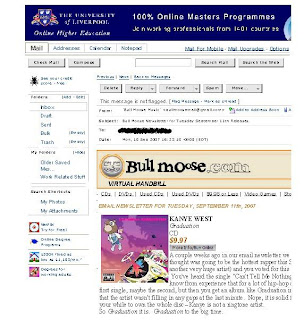 Though the print is small in this example, you can see that on the left hand side are all the graphics from your Yahoo! screen & on the right, the text of the message has been cut off. The reason for this is that, while I had wanted to print the email message, what I have actually done is printed the screen image. This is most likely because I used the drop down File - Print option or printer icon
 A comparison of these type examples will show that about half of the message was printed using the File -- Print or icon print image on the windows page.
  What this printout is providing is the screen image for the record I found, not the content of the article I'm hoping to print. Again, drop down File - Print option or printer icon

 This print has eliminated the peripherial & irrelevant images from the previous print, focusing instead on the written content I wanted printed.
 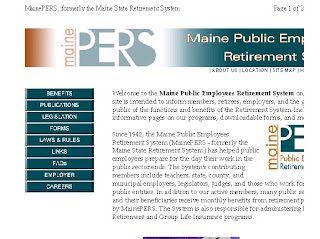 As you can see, the image & text has been sliced on the right hand side, omitting the ends of sentences, essentially making worthless the entire print job.
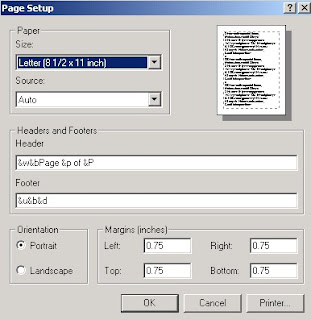 And here is the Page Setup menu in Landscape mode:
 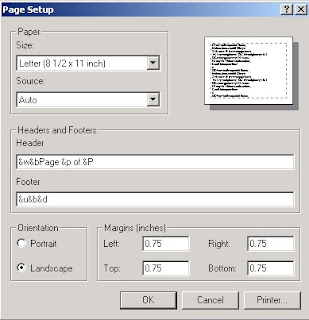 Landscape mode turns the page on its side. This often nullifies printouts that have chopped off the end of horizontal lines.
 Recapping & Summing Up
 2) The database providing access to Consumer Reports is Academic Search Premier. It is the first database on the alphabetical list of databases.
 3) To limit your search to Consumer Reports articles, you can either electronically add Consumer Reports by
 c) Clicking the box next to Consumer Reports & clicking on Add.
 d) Now, that Consumer Reports is in the "Find" box, click on Search.
 e) Or, you can manually type in (JN "Consumer Reports") in one of the three search boxes.
 4) Once you have limited your search to Consumer Reports, now you can add a search term, such as refrigerator into your search. Click Search or just hit "enter."
 5) On your results page, you may see either an Article Linker tag, PDF Full Text tag, or an HTML Text tag in the results of your search. The Article Linker results are those that are currently embargoed & are not available yet in full text on-line (but Bangor Public Library does own in print). The PDF Full Text results will provide easy links to magazine quality reproductions of Consumer Reports articles.
 6) If you need further assistance with this search or for other tips on how to use this or other Marvel! databases, contact a reference librarian (
 2)The database to access is Literature Resource Center. You may get to this database by
 B. Selecting Literature Resource Center from the Literature list:
  C. Scrolling down to Literature Resource Center on the A-Z listing of databases:
 3) Do an Advanced search.
 4) Put an author's name in the first search box, using Author as the search term. Put the title of the story or novel in the second search box, using Title as the search term. Click the green Search button.
  5) For journal articles and reviews, click the Literary Criticism, Articles and Work Overviews tab.
  6) To view the journal articles and reviews, click Literary Criticism.
  7) From this results list, you can easily read or print any articles that will be helpful for your research.


